
Mobile App – Now Live on iOS & Android
Our mobile apps are officially available on both iOS and Android!
Enjoy a cleaner, more intuitive interface that enhances navigation and overall usability.
Highlights:
-
Easily create proposals, manage projects, and stay productive while on the go.
-
The refreshed design provides a smoother, more accessible experience across devices.
Estimating Enhancements
We’ve simplified the upgrade workflow to make estimating faster and more intuitive.
Key Improvements:
-
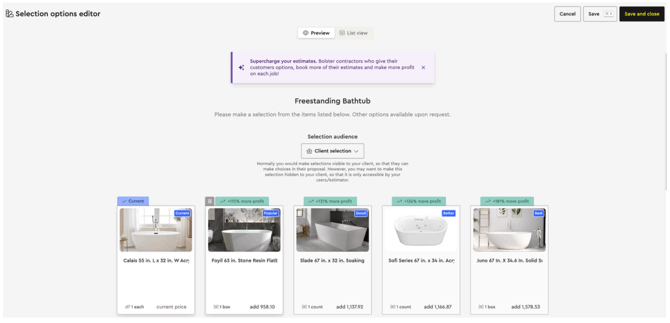
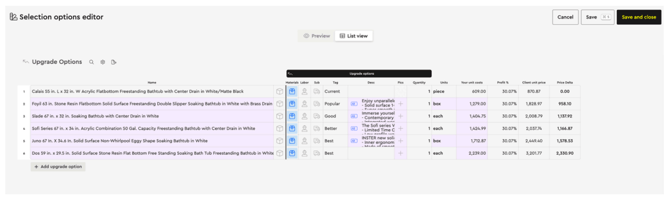
List View for Upgrades: You can now view upgrades in a spreadsheet-style list view for better clarity and comparison.
-
Dual Display Modes: Base items can be viewed in both card and list formats, making it easier to compare them with their corresponding upgrades.
-
Streamlined Interface: Navigate and edit selections effortlessly, whether you prefer a visual or data-centric view.
Presentation Options
We’ve expanded flexibility in how options are displayed during client presentations.
-
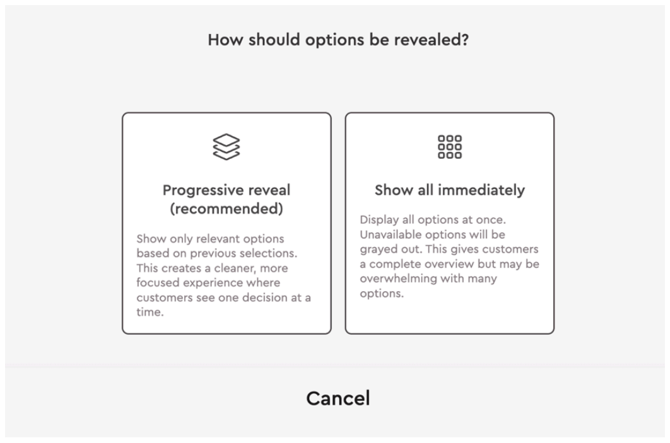
You can now choose to show all selector tool options at once, giving clients a full overview.
-
By default, the system still uses the progressive reveal method, showing only relevant options based on prior selections — ideal for a focused and guided customer experience.

Improved Notifications & Communication
Transparency in project communication just got better.
What’s New:
-
Comprehensive Project Chat Logs: All user and homeowner activity is now captured within each project’s chat, providing a detailed communication history.
-
Email Tracking: Notifications now include alerts for proposal and invoice deliveries, as well as when a homeowner/client opens the email.
QuickBooks Integration Upgrades
Financial management just became even more seamless.
New Automations:
-
Automatic Expense Syncing: Expenses created in the platform now automatically sync to QuickBooks.
-
Bill Payment Sync: When an expense is marked as paid, it automatically syncs to QuickBooks as a Bill Payment, reducing manual entry and reconciliation time.
